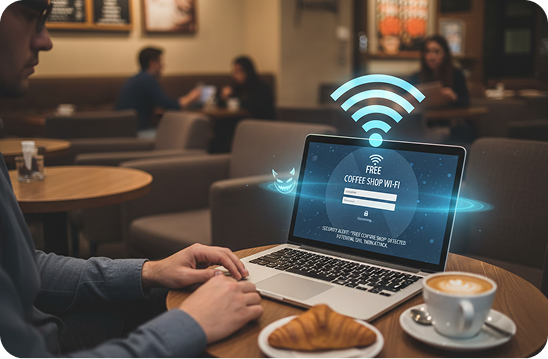
You walk into a coffee shop, order your drink, open your laptop, and look for the Wi-Fi.
There it is.
“CoffeeShop_Free_WiFi.”
Strong signal. No password. Exactly what you expected.
You connect without hesitation.
What you don’t notice is the person sitting a few tables away, laptop open, quietly watching a new device join their network.
That’s not the coffee shop’s Wi-Fi.
It’s an evil twin attack.
The Comfort of Free Wi-Fi, and Its Hidden Risk
Free public Wi-Fi has become part of everyday life. We use it in cafés, airports, hotels, and malls without a second thought. It feels harmless, even helpful, a small convenience in a busy day.
But that convenience comes with a risk most people never consider.
An evil twin attack doesn’t involve breaking into your device or installing malware. Instead, it relies on something much simpler: your trust. The attacker creates a Wi-Fi network that looks legitimate and waits for people to connect on their own.
There are no warnings, no error messages, and nothing that looks suspicious. Everything works exactly as expected, and that’s the problem.
What Is an Evil Twin Attack?
An evil twin attack occurs when a hacker sets up a fake Wi-Fi network designed to look identical to a real one. The network name matches what you expect to see, the signal is strong, and often there’s no password required.
To your phone or laptop, it looks just like any other network. To you, it feels familiar and safe.
Once you connect, your internet traffic passes through the attacker’s device before reaching the internet. They don’t need to touch your computer or install anything. By joining the network, you’ve unknowingly placed them between you and everything you do online.
This isn’t a technical exploit.
It’s a psychological one.
Why Public Wi-Fi Is an Easy Target
Public places are perfect environments for these attacks because of how people use Wi-Fi. Most users are in a hurry, looking for free access, and assuming someone else has handled security.
In cafés and airports, Wi-Fi names are predictable. Staff rarely monitor who creates networks, and users almost never confirm which one is real. As long as the name looks right, people connect.
Attackers understand this behavior and design their traps around it. They don’t need to be hidden, they just need to blend in.
A Situation You’ve Probably Been In
Imagine you’re waiting at an airport for your flight. You open your phone and connect to a network called “Airport_WiFi.”
While you wait, you check your email, scroll social media, browse a shopping site, maybe even open your banking app. Everything loads normally. There are no signs anything is wrong.
Behind the scenes, however, your data may be passing through someone else’s device.
This is how data theft on public Wi-Fi often happens, not through obvious attacks, but through quiet observation. You continue using the internet as usual, unaware that someone else is watching.
What an Attacker Can See
When you connect to a fake Wi-Fi network, attackers can gain insight into more than most people realize. They may see which websites you visit, intercept login sessions, or redirect you to fake pages that look legitimate. In some cases, they can push users toward malicious sites without raising suspicion.
There are no pop-ups or alerts to warn you. Everything looks normal, which is why these networks are so effective.
“But the Website Shows a Lock Icon…”
Many people assume the lock symbol in their browser means they’re completely protected. While it does help encrypt data, it doesn’t eliminate all risk.
Attackers can still see which sites you visit, track usage patterns, and exploit apps or pages that aren’t fully secured. Security isn’t always broken outright, sometimes it’s simply bypassed by placing the attacker in the middle of the connection.
Reducing Your Risk on Public Wi-Fi
You don’t need technical knowledge to protect yourself. Small habits make a big difference.
Confirm the exact Wi-Fi name with staff instead of guessing. Be cautious of networks that don’t require a password. Turn off automatic Wi-Fi connections on your devices so they don’t connect without you noticing.
Avoid accessing sensitive accounts, such as banking or payment apps, on public Wi-Fi. When possible, use mobile data for those tasks, or a trusted VPN if public Wi-Fi is unavoidable.
These steps won’t slow you down, but they can prevent serious problems.
Why This Attack Still Works
Evil twin attacks don’t rely on sophisticated tools or advanced hacking skills. They rely on familiarity, convenience, and human behavior.
There are no alarms, no dramatic moments, and no obvious mistakes. Just a network that looks right and feels safe.
That’s why these attacks remain common and effective.
A Final Thought
The next time you see a “Free Wi-Fi” network, pause for a moment.
It might belong to the coffee shop.
Or it might belong to the person sitting nearby with a laptop and a little patience.
In the digital world, familiarity doesn’t always mean safety. And sometimes, the most dangerous connection is the one that feels the most convenient.