

Microinteractions That Make a Big Difference in User Experience
October 06, 2025
In the world of digital design, sometimes the smallest details create the biggest impact. This is especially true when it comes to micro interactions in UX — those tiny, subtle moments that guide, provide feedback, and engage users without overwhelming them. Though often overlooked, micro interactions play a pivotal role in shaping how users feel about a product, turning routine actions into delightful experiences.
What Are Micro Interactions in UX?
Micro interactions are small, single-purpose moments within a user interface where a user and the system interact. Think of them as the tiny animations, visual cues, or sounds that respond to your actions — like the way a button changes color when you hover over it or a little checkmark appears when you submit a form. These UX micro interactions provide immediate feedback that lets users know their actions have been noticed and understood.
Dan Saffer, a leading expert on micro interactions, breaks them down into four key parts: triggers, rules, feedback, and loops or modes. The trigger starts the interaction — it could be a click, swipe, or system event. The rules define what happens after that trigger. Feedback is the response that the user sees or hears, and loops/modes control the duration or repetition of the interaction.
By incorporating these elements thoughtfully, designers create intuitive, engaging interfaces that feel responsive and alive.
Why UX Micro interactions Matter
At first glance, micro interactions might seem like mere decoration. However, their impact on user experience is profound:
- Enhancing Usability: Micro interactions guide users by providing intuitive cues. For example, a button that slightly expands when hovered over signals it is clickable, reducing confusion and helping users navigate the interface effortlessly.
- Providing Feedback: Immediate visual or auditory responses reassure users that their inputs have been received and processed. When you add an item to a shopping cart and see a quick animation, you know the action was successful — building trust in the system’s reliability.
- Reducing Errors: They help prevent mistakes by showing users when an input is incorrect or incomplete, often through subtle animations or color changes in forms.
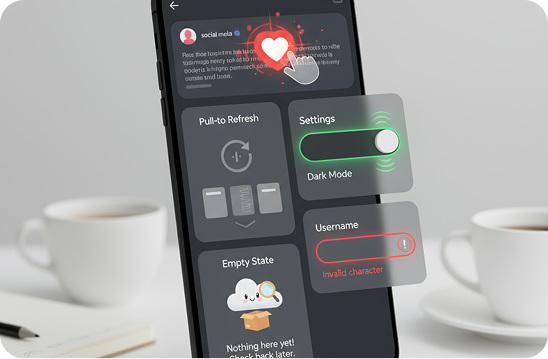
- Making Experiences Enjoyable: Small touches, like a heart animation when you like a post, inject personality and delight, transforming mundane tasks into enjoyable moments.
All these benefits contribute to more satisfying user journeys, ultimately encouraging users to stay longer and engage more deeply.
UI Micro interactions in Practice
Micro interactions are everywhere in modern UI design, and when done well, they blend seamlessly into the overall experience. Here are a few common UI micro interactions that enhance a product’s usability and appeal:
- Hover Effects: Changing colors, shadows, or size when a cursor hovers over buttons or links guides users on where to click.
- Loading Animations: Progress bars or spinning icons show users that the system is working, preventing frustration during wait times.
- Form Interactions: Inline validation, where form fields highlight errors instantly, prevents users from submitting incorrect information.
- Toggle Switches: Visual animations when toggling settings provide clear communication about changes being made.
- Notifications: Subtle pop-ups or badge counters inform users of new messages, updates, or achievements.
These micro interactions create a more interactive and communicative interface that users instinctively understand and appreciate.
Micro interactions Examples That Inspire
To understand the power of UX micro interactions, looking at real-world examples helps:
- Hootsuite’s Magnetic Cards: When you hover over a card, it subtly lifts as if attracted by a magnet, signaling it’s interactive. This encourages exploration and makes navigation more intuitive.
- Dribbble’s 404 Page: Instead of a dull error message, Dribbble’s 404 page presents an engaging animation made up of tiny images from the platform’s best designs, making the glitch more bearable and reinforcing brand personality.
- Apple’s Landing Pages: On product pages like for the iPhone 16, features are introduced progressively with carousels and expandable content. This functional use of micro interactions breaks down complex information into easily digestible parts, keeping users engaged and in control.
- E-commerce Forms: Many online stores implement progress indicators and inline error notifications to guide users through multi-step checkout forms smoothly, reducing friction and increasing customer confidence.
Each of these examples proves how thoughtfully crafted micro interactions not only polish the interface visually but also solve real problems in usability and engagement.
Website Micro interactions: Best Practices
When integrating micro interactions into website design, there are some best practices to keep in mind:
- Be Purposeful: Every micro interaction should serve a clear function — guiding users, providing feedback, or enhancing usability. Avoid adding animations just for decoration as they can become distracting.
- Keep Them Subtle: Micro interactions should feel natural and blend with the overall design. They must not interrupt the user flow or cause delays.
- Ensure Consistency: Use similar interaction patterns across the site to avoid confusing users. Consistency helps users build a mental model of how the interface works.
- Optimize Performance: Animation and interactions should be smooth but lightweight. Heavy scripts or laggy transitions harm user experience instead of helping it.
- Test with Users: Observe how users respond to micro interactions. Are they intuitive? Do they enhance clarity or cause confusion? Feedback is vital to refinement.
Looking Ahead: The Future of Micro interactions
As technology advances, micro interactions will continue to evolve with richer animations, haptic feedback, and AI-driven personalization. We’re moving towards interfaces that not only respond to our actions but anticipate them subtly, making digital experiences even more human and immersive.
In the end, micro interactions in UX are small details with big impacts. By focusing on these, designers can create digital products that are not only functional but also a joy to use — turning simple clicks and taps into memorable moments.